Job Alerts allow reminder notifications to be configured against a vacancy. Alerts can be sent to applicants who have started but not completed an application, as well as to assigned users of the job to notify them when a vacancy is approaching its closing date.
Step 1: Access the Job Alerts Tab
When creating a new job, navigate to the Job Alerts tab.
Alternatively, locate the relevant job in the Jobs List, click the three dots under Actions, select Edit, and then navigate to the Job Alerts tab.
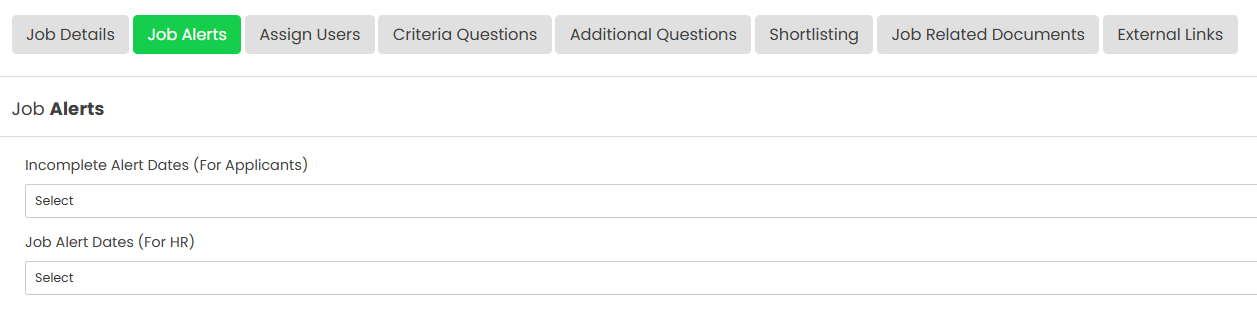
Step 2: Configure Incomplete Alert Dates (For Applicants)
Incomplete Alert Dates can be used to send reminder emails to applicants who have registered for the job but have not yet submitted their application.
The following alerts can be selected:
- One Day Alert – Sends an email one day before the closing date.
- Two Day Alert – Sends an email two days before the closing date.
- Three Day Alert – Sends an email three days before the closing date.
- Four Day Alert – Sends an email four days before the closing date.
- Five Day Alert – Sends an email five days before the closing date.
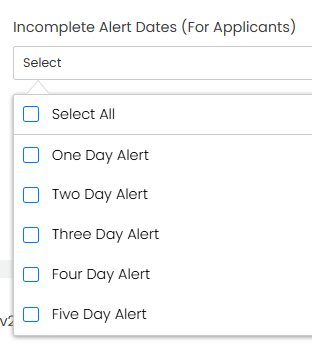
Any combination of alerts can be selected. For example, all five alerts can be enabled or a single reminder can be configured.
Step 3: Configure Job Alert Dates (For Assigned Users)
Job Alert Dates can be used to send reminder emails to users assigned to the job, notifying them when the vacancy is due to close or has recently closed.
The following alerts can be selected:
- One Day Alert – Sends an email one day before the closing date.
- Two Day Alert – Sends an email two days before the closing date.
- Three Day Alert – Sends an email three days before the closing date.
- Four Day Alert – Sends an email four days before the closing date.
- Five Day Alert – Sends an email five days before the closing date.
- Zero Day Alert – Sends an email on the day the job closes.
- Plus One Day Alert – Sends an email one day after the job closes.
- Plus Two Day Alert – Sends an email two days after the job closes.
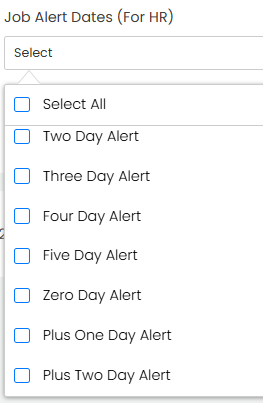
Any combination of alerts can be selected. For example, all eight alerts can be enabled or a single reminder can be configured.
Step 4: Save Your Changes
Once the required alerts have been configured, click Save to apply.
Was this article helpful?
That’s Great!
Thank you for your feedback
Sorry! We couldn't be helpful
Thank you for your feedback
Feedback sent
We appreciate your effort and will try to fix the article