By default, GetGot only allows one application to be submitted per email address. The Allow Multiple Submissions from the Same Email Address setting overrides this validation and enables multiple applications to be submitted using the same email address.
This setting is typically used for vacancies that accept applications from recruitment agencies, allowing multiple candidates to be submitted by the same agency email address.
When creating a job, scroll to the bottom of the Job Details section and tick Allow Multiple Submissions.
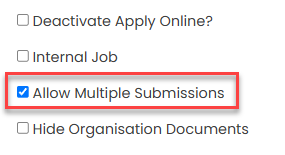
Once enabled, complete the remaining required job details and click Save to create the vacancy.
Was this article helpful?
That’s Great!
Thank you for your feedback
Sorry! We couldn't be helpful
Thank you for your feedback
Feedback sent
We appreciate your effort and will try to fix the article