The five default workflow stages can be customised to suit your recruitment process, including the ability to add, remove, reorder, and edit stages as required.
Only Standard Users assigned to the job can edit the workflow for that recruitment exercise.
Step 1: Access the Job Workflow
Navigate to Applicant Tracking > All ATS Jobs.
Locate the relevant job, select the three dots under the Actions column, and click Edit Workflow.
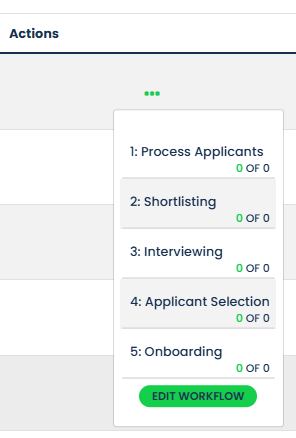
Step 2: Amend Workflow Stages
Within the workflow editor, you can customise the recruitment process for the selected job.
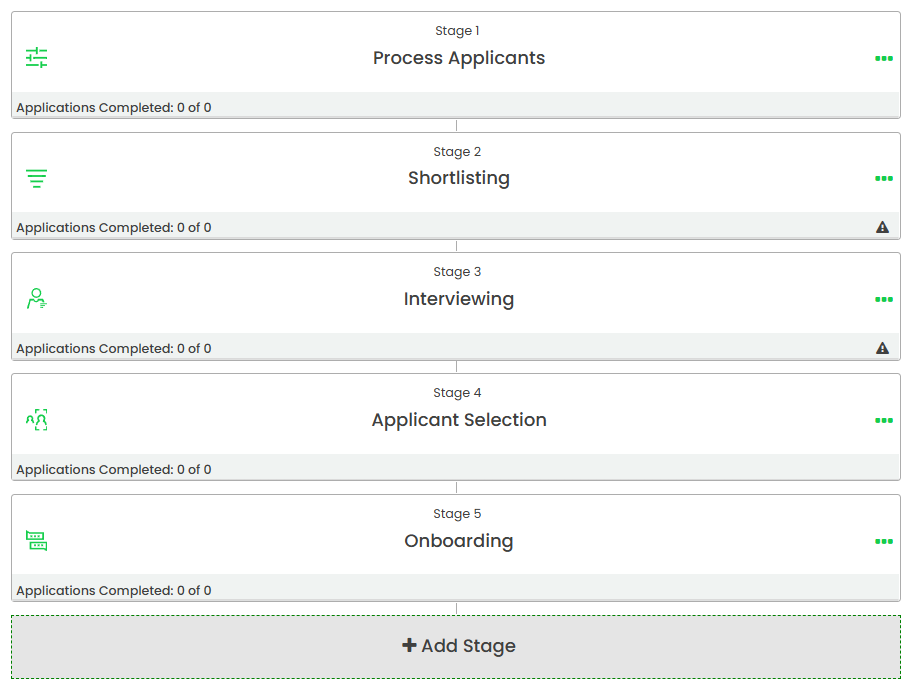
The following actions are available:
- Reorder stages by dragging and dropping stage tiles into the desired sequence.
- Add new stages to the workflow.
- Edit existing stages.
- Delete stages that are no longer required.
To edit or delete a stage, select the three dots beside the relevant stage.
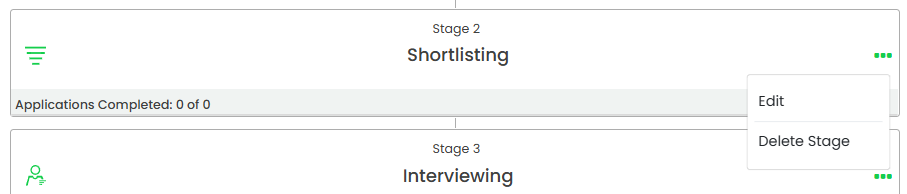
Step 3: Edit Stage Details
When editing a stage, the following settings can be configured:
- Assigned Users - Select the Standard Users responsible for reviewing and processing applicants within the stage.
- Assigned Managers - Select the Managers who should have visibility of applicants within the stage. Managers assigned to a stage can also be designated as Hiring Managers, allowing them to review and process applicants within that stage. Hiring Managers have the same stage-level access as Standard Users, with the exception of editing the workflow configuration.
- Email Templates - Choose the email templates to be used when applicants are progressed through the stage.
- Review Questions - Configure assessment questions for Shortlisting and Interviewing stages.
Users and Managers must be assigned to the job before they can be selected within a workflow stage.
Step 4: Configure Review Questions
For the Shortlisting and Interviewing stages, assigned Standard Users can add assessment questions by selecting Add Question.

Questions can be sourced from:
- Pre-built competency questions
- Application form questions
- Criteria questions
- Additional questions
- Custom questions created specifically for the recruitment exercise
These questions can then be used by reviewers and interviewers to assess applicants throughout the recruitment process.
Was this article helpful?
That’s Great!
Thank you for your feedback
Sorry! We couldn't be helpful
Thank you for your feedback
Feedback sent
We appreciate your effort and will try to fix the article