 The Job-Related Documents function allows users to attach job specific documents, such as the long job description, presentation guidance notes or interview details.
To add a document, click on the Add Document button.
Enter a description for your document in the Document Title field.

To select the document to upload, click the Browse button.

This will open a Windows search box, locate your file, and click Open
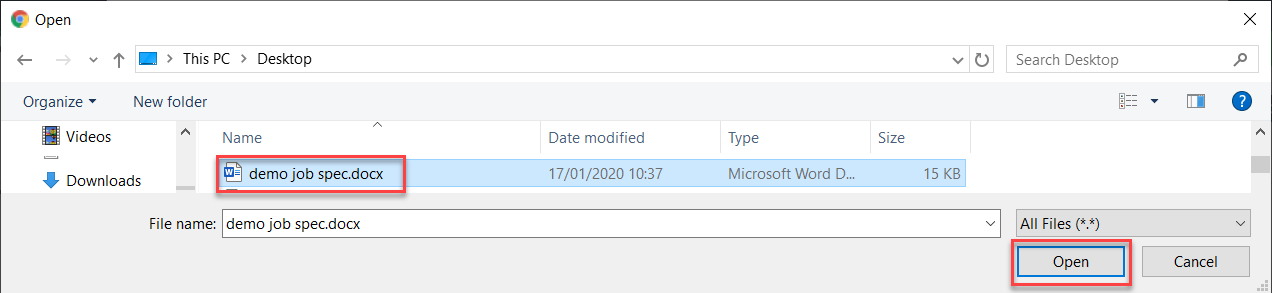
NOTE: Documents can be uploaded as either a PDF document or as a Microsoft Word document.
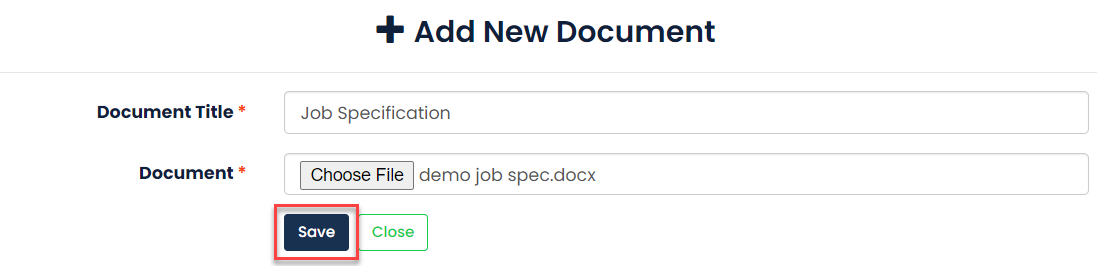
When you have done this click Save to continue
You can then download the document to check that is correct by clicking the Download Document button. You can change the document by clicking Edit Document. Or you can remove it completely by clicking Delete Document.

Was this article helpful?
That’s Great!
Thank you for your feedback
Sorry! We couldn't be helpful
Thank you for your feedback
Feedback sent
We appreciate your effort and will try to fix the article