Your account will automatically unlock after a 10 minute period.
Or alternatively, you can follow the Forgot Password instructions and this will unlock your account immediately after the reset of your password.
How to Reset My Profile Password?
If you have registered as a Profile user, you will be required to enter a password in order to log in. If you cannot remember this password, you can change it by using the Forgot Password button on the login screen.
To open the login screen, Click here.
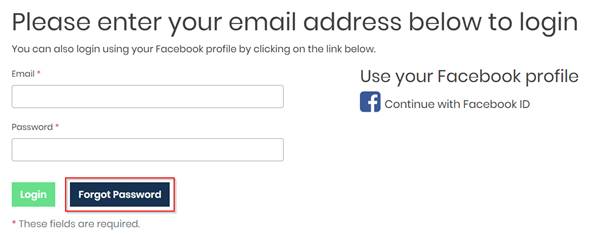
You will then be asked to supply the email address that you registered with. Enter this and click Reset Password.
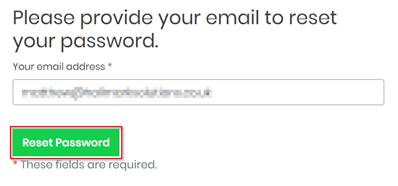
This will generate an email that will send to the email address entered. This contains a link you must follow to complete the reset. PLEASE NOTE: Also check junk/spam folders for this email.
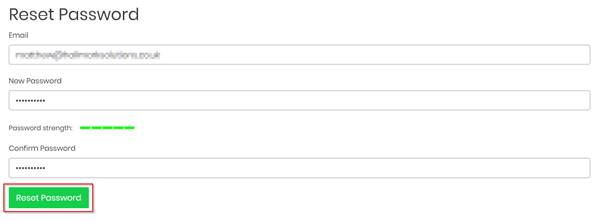
Click on the Reset Password link in the email. This will take you to a web page where you must enter your email address and the new password you would like. The password must be between 8 and 20 characters long and contain the following;
- at least one uppercase,
- at least one lowercase,
- at least one digit
- at least one special character !@#$%^&*
When these details have been entered click Reset Password.
When this has been successful you will receive the following message.

Users Registered Using Facebook:
You are using your Facebook account to access GetGot. If you want to change this password, you will need to log into Facebook and change the password for this account.
Should you require any further assistance, please do not hesitate to contact us.
Kind regards
Was this article helpful?
That’s Great!
Thank you for your feedback
Sorry! We couldn't be helpful
Thank you for your feedback
Feedback sent
We appreciate your effort and will try to fix the article