Users must be logged into either an Admin account or a Standard User account that is assigned to the relevant job to access and submit promotion requests.
GetGot provides additional opportunities to promote your vacancies to a wider audience through the GetGot Jobs Board and our media partners, The Irish News and Q Radio. Organisations subscribed to the Enhanced Package have access to seven promotion options and are allocated a promotions balance for a 12-month period.
Promotions can be used on a job-by-job basis, allowing you to select a single promotion option or combine multiple promotion options for the same vacancy.
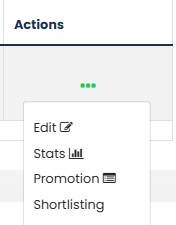
To request a promotion, locate the relevant job in the Jobs List, click the three dots under the Actions column, and select Promotion. This will open the promotion request form where promotion details can be entered and submitted.
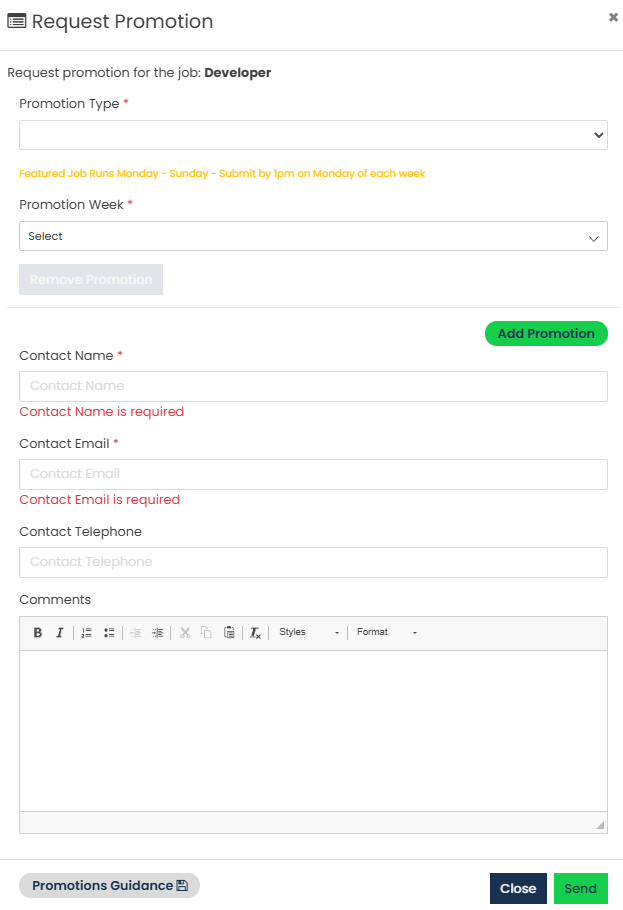
Complete the form by selecting the required Promotion Type and Promotion Week(s). Promotions can be requested for up to four weeks, and requests cannot be made more than four weeks in advance. Enter the required Contact Name and Email Address before submitting your request.
Available Promotion Types:
- Job Board - Home Page
- Job Board - Job Search
- Job Board - Industry Hub
- Irish News - Website
- Irish News - Print
- Q Radio - Website
- Q Radio - Radio Advertisement
Multiple promotion options can be requested for the same vacancy at the same time. To do this, click Add Promotion within the promotion request window and complete the details for the additional promotion. Repeat this process for any further promotion options required. If a promotion option is no longer required, click Remove Promotion to remove it from the request.
A downloadable Promotions Guidance document is available from the promotion request form and provides full details on the available promotion options and packages.
For further information on promotion packages and pricing, please contact Hallmark Solutions.
Was this article helpful?
That’s Great!
Thank you for your feedback
Sorry! We couldn't be helpful
Thank you for your feedback
Feedback sent
We appreciate your effort and will try to fix the article