 Click on the Open Jobs tile to open a list of open jobs currently assigned to you on GetGot.
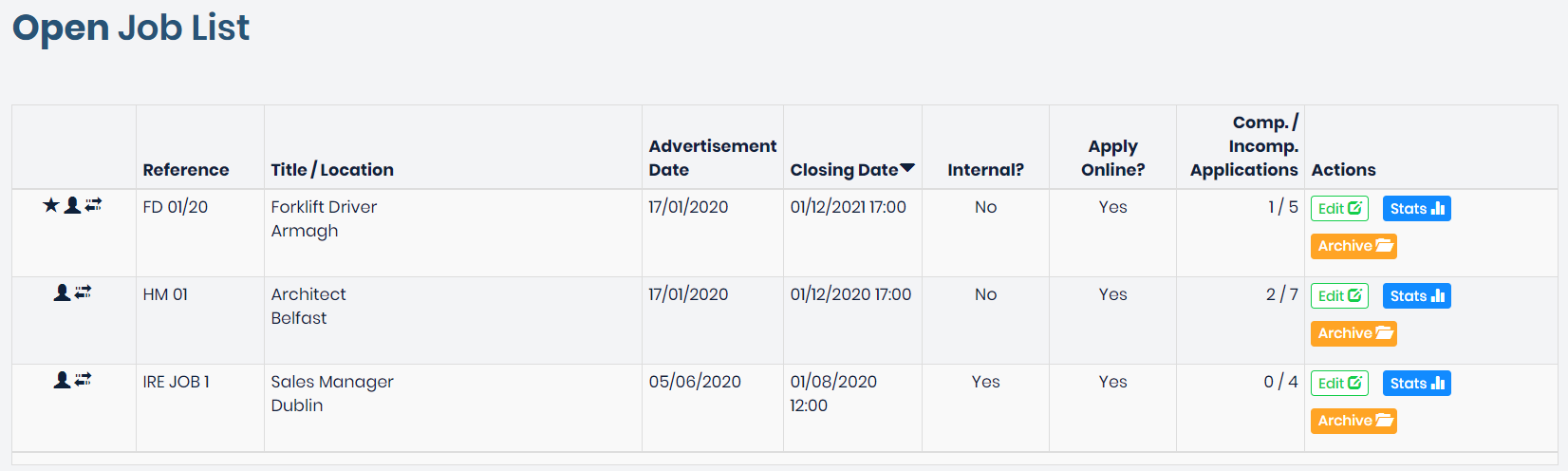
An open job is defined as a job that is in the future and has yet to be advertised, or a job that is currently live and advertised on the GetGot job page. These jobs will display on a list as shown below:
From this list a standard user can make changes to the job by clicking Edit. (For more information on editing a job please go to Configuring a Job on GetGot)
They can also view applicant information and statistics by clicking Stats. (For more information on jobs stats please go to Managing Applicants)
Or the job can be archived by clicking Archive. This will remove from the live job list for applicants and can then be permanently deleted from the system. (For more information on jobs stats please go to Archived Jobs)
Was this article helpful?
That’s Great!
Thank you for your feedback
Sorry! We couldn't be helpful
Thank you for your feedback
Feedback sent
We appreciate your effort and will try to fix the article